
The Custom Date Range report generates a PDF of Client Shop Views.
Begin by selecting a survey on the top of the filter bar.
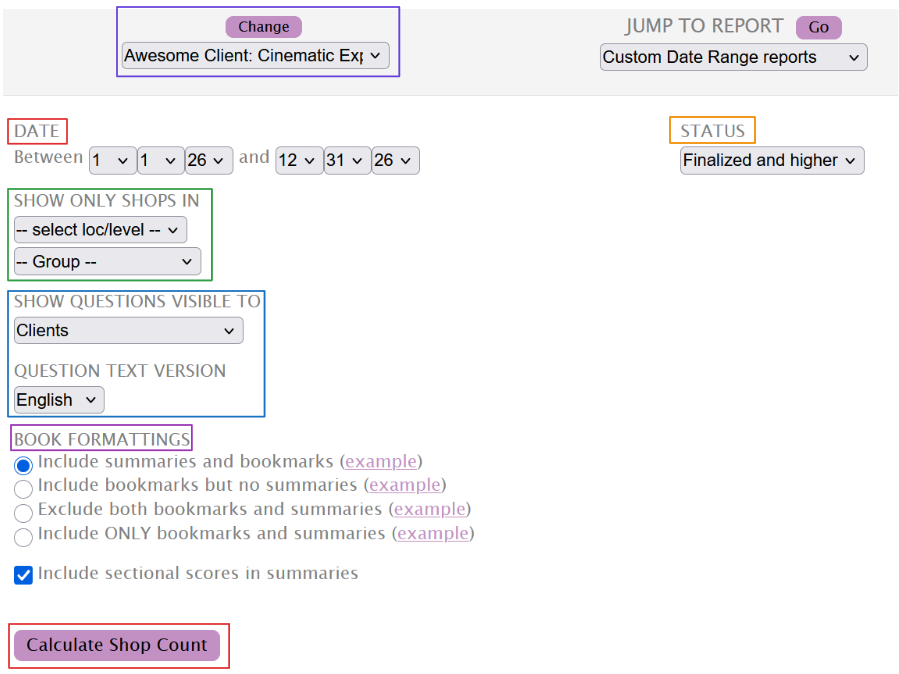
While the Date range selector will be automatically set to the current year, you can edit it to match the range you require.
The Show Only Shops In filter allows you to limit the data being displayed by Levels, and Groups. These filters can be used together or individually to match the generated data to your requirements.
Use the Status dropdown to include the shops in the available statuses: Finalized and higher, Finalized only, Emailed only, Client Finalized only, and Locked only.
The Show Questions Visible to filter allows you to select the questions based on their visibility, while the Question Text Version ensures you can export the data in the preferred language.
The Book Formattings settings allow you to customize how the PDF is generated.
The report can include bookmarks (points in the PDF that you can jump to) and/or additional summary pages for levels and locations. Each option has a clickable link to see the differences.
Using the last checkbox will include Sectional Scores to the PDF's summaries.
Once content with the selection, use the Calculate Shop Count button.
Once the system is finished with the process, it will let you know how many shops will be included in the report.

Use the Generate Report button to generate the report. If the number of shops is high, the report will be generated offline, and a link to the download will be emailed to you once the process is complete.